# Image Cropper
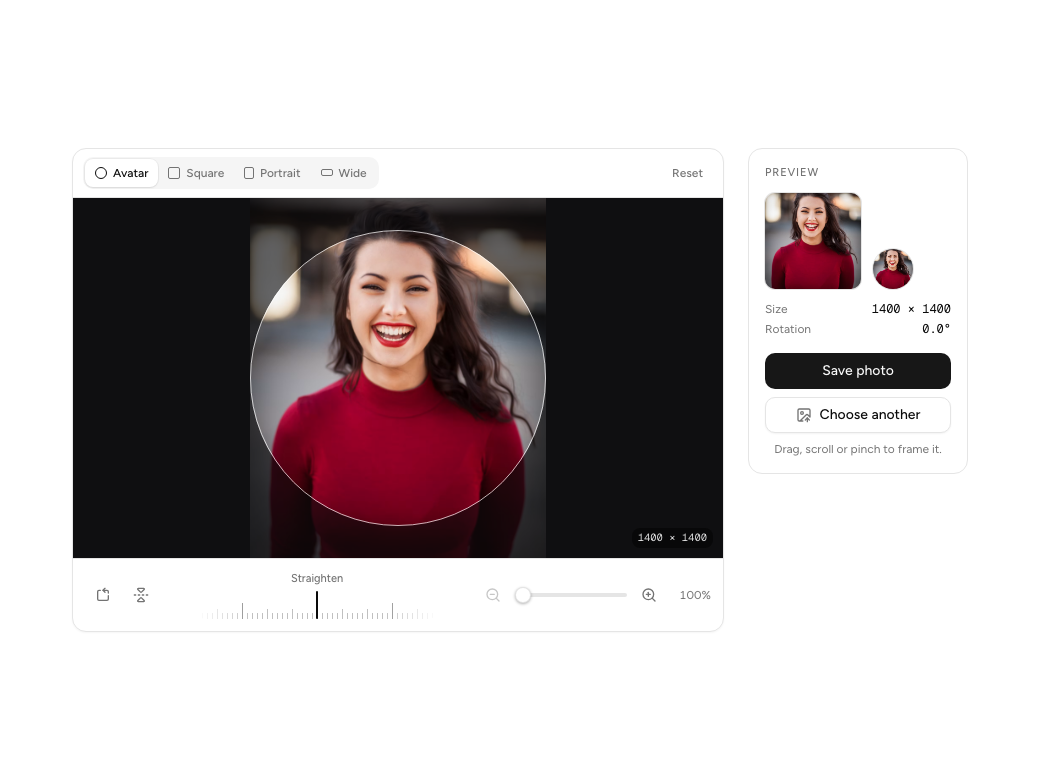
> A photo cropper for avatars and covers: drag to reposition, scroll or pinch to zoom toward the pointer, straighten on a ruler dial, rotate and flip. The image always covers the crop at any angle, thirds appear while you adjust, and the outside dims (round for avatars). Keyboard pan, zoom and rotate, natural-pixel coordinates, plus drawCrop and cropToBlob to export.
- Slug: `image-cropper`
- Category: [Media](https://www.assembli.design/category/media.md)
- Type: component
- Tags: crop, image, avatar, upload, zoom, rotate, photo, editor
- npm dependencies: lucide-react
- shadcn/ui dependencies: none
- Live preview: https://www.assembli.design/preview/image-cropper
- Page: https://www.assembli.design/components/image-cropper
## Props
Other props pass through to the root element.
| Prop | Type | Default | Description |
| --- | --- | --- | --- |
| `src` (required) | `string` | | |
| `alt` | `string` | `""` | |
| `aspects` | `CropAspect[]` | `DEFAULT_ASPECTS` | Shapes to choose from. One hides the switcher. Defaults to Square, Portrait, Wide and Original. |
| `defaultAspect` | `number` | `0` | Index into `aspects`. |
| `height` | `number` | `360` | Height of the editing stage in px. Defaults to 360. |
| `maxZoom` | `number` | `5` | How far past "fills the crop" you can zoom. Defaults to 5. |
| `onCropChange` | `(area: CropArea) => void` | | Fires as the crop changes, with natural-pixel coordinates for `drawCrop` / `cropToBlob` or your server. |
| `crossOrigin` | `"anonymous" \| "use-credentials"` | `"anonymous"` | Sent on the ![]() ; keep `"anonymous"` for remote images you want to export. |
## Install
One-time setup (needs a subscription):
1. Add the registry to the project's `components.json`: `{"@assembli":{"url":"https://www.assembli.design/r/{name}.json","headers":{"Authorization":"Bearer ${ASSEMBLI_API_KEY}"}}}` (merge into `"registries"`).
2. Put an API key from https://www.assembli.design/account in `.env.local` as `ASSEMBLI_API_KEY=asm_…`.
Then install with the shadcn CLI (writes `components/image-cropper/image-cropper.tsx` and installs dependencies):
```bash
npx shadcn@latest add @assembli/image-cropper
```
Registry item JSON: https://www.assembli.design/r/image-cropper.json (send `Authorization: Bearer `)
## Code
> Component source needs an Assembli subscription ($12/month or $96/year) and an API key sent as `Authorization: Bearer `. To get one without copying anything, POST https://www.assembli.design/api/agent/login (or call the MCP tool connect_account), show the user the link it returns, and poll https://www.assembli.design/api/agent/token for the key. Or subscribe at https://www.assembli.design/pricing and create a key at https://www.assembli.design/account.
; keep `"anonymous"` for remote images you want to export. |
## Install
One-time setup (needs a subscription):
1. Add the registry to the project's `components.json`: `{"@assembli":{"url":"https://www.assembli.design/r/{name}.json","headers":{"Authorization":"Bearer ${ASSEMBLI_API_KEY}"}}}` (merge into `"registries"`).
2. Put an API key from https://www.assembli.design/account in `.env.local` as `ASSEMBLI_API_KEY=asm_…`.
Then install with the shadcn CLI (writes `components/image-cropper/image-cropper.tsx` and installs dependencies):
```bash
npx shadcn@latest add @assembli/image-cropper
```
Registry item JSON: https://www.assembli.design/r/image-cropper.json (send `Authorization: Bearer `)
## Code
> Component source needs an Assembli subscription ($12/month or $96/year) and an API key sent as `Authorization: Bearer `. To get one without copying anything, POST https://www.assembli.design/api/agent/login (or call the MCP tool connect_account), show the user the link it returns, and poll https://www.assembli.design/api/agent/token for the key. Or subscribe at https://www.assembli.design/pricing and create a key at https://www.assembli.design/account.